Delivery Date And Time Slot At Checkout Program

Delivery Date And Time Slot At Checkout Program
New

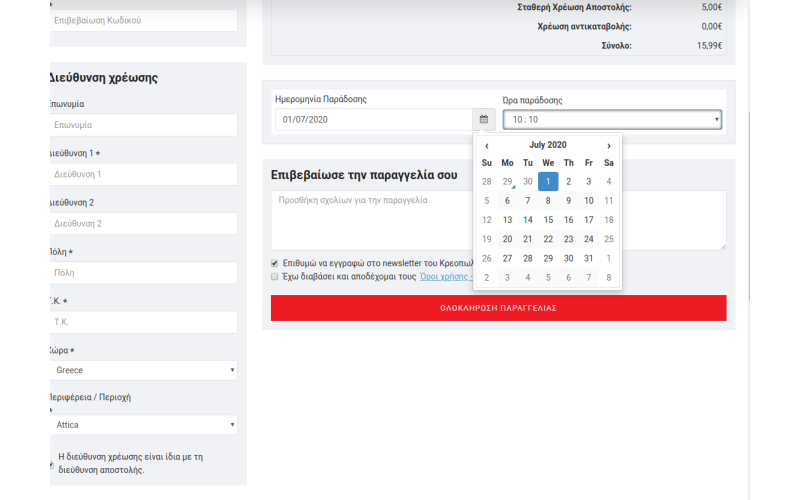
Date, delivery time and time slot selection program at the Cashier.


Characteristics:


• Order delivery based on the desired date and time of delivery by the customer.


• Show delivery date and time confirmation message at checkout.


• Order confirmation button disabled until delivery date and time is set, once set it will be enabled automatically.


• Date options for delivery date field.


• Delivery time has a drop down field.


• Enable / disable delivery time field by admin.


• Set weekend days (holiday days) so customer can't select weekend dates like Saturday, Sunday.


• Example: Saturday, Sunday, so all dates of these days are excluded when choosing a delivery date.


• Valid delivery date from - to days, so days in the past - future dates are excluded.


• e.g. from 1 to 10, so 1 = Tomorrow to next 10 days available, other dates are excluded.


• Set holiday dates as comma separated so that these dates are excluded.


• Set active hours (comma separated). Example 10,11,12,13,14,15. (24 hour format)


• Set the time interval (in minutes). Example: 30 minutes. so the time will be 10:00, 10:30, 11:00, 11:30 .... 15:00


• Times are loaded based on the selected delivery date.


• If the selected delivery date is the current date and the current time is 14:10, then the dropdown time has only 14:30, 15:00. The previous time is canceled.


• If the selected delivery date is tomorrow, then the time dropdown has all options from 10 ... to ... 15 delivery hours.


• Once the delivery date is selected, delivery time data will be automatically saved and loaded into the dropdown field.


• The delivery date and time are automatically stored in the selection event.


• The selected delivery date and time is in the order confirmation email.


• Admin can view delivery date and time on:


-> Admin> control panel> Recent Order


-> Admin> Sales> Order List


-> Admin> Sales> Orders> View


-> Admin> Sales> Orders> Print Invoice


-> Admin> Sales> Orders> Shipping Label


• Delivery date and time column + filter in admin>Sales>Order list


• Admin can change delivery date and time from admin panel at: Admin> Sales> Orders> View orders


• Compatible with multiple stores.


• Compatible with many languages


The price includes the installation and arrangement of the program.

Write a review

Note: HTML is not translated!
Rating
Bad Good
Payment by credit card of the bank of your choice. The purchase cost of the program includes the purchase, installation of the product and proof of it..
1,00€
Ex Tax:1,00€
Commercial Management Program including: Warehouse, + Securities, Sellers (statements, financial/statistical records), Customers, Orders, Invoicing, R..
1,00€
Ex Tax:1,00€
Add to Cart
Galaxynet top start. Commercial Management Program that includes: Customers, Orders, Invoicing, Receipts, Cashier, Prints, Connection to a cash regist..
1,00€
Ex Tax:1,00€
Add to Cart
CONNECT the e-shop with FACEBOOK. Possibility for the customer to be able to login to his Facebook page via the e-shop and to be able to place orders ..
1,00€
Ex Tax:1,00€
Construction of Google shopping application and connection of the customer's e-shop with our company's e-shop www.bestprice-shop.gr. Customer training..
1,00€
Ex Tax:1,00€
Add to Cart
Creation of several filters on products for better search by e-shop visitors...
1,00€
Ex Tax:1,00€
Display two prices on products in case we have discounts on them, with/without VAT. E.g. The price without VAT should appear large and in bold letter..
1,00€
Ex Tax:1,00€
Add to Cart
ERP connection with OpenCart...
1,00€
Ex Tax:1,00€
Add to Cart